Creating a personalised welcome message
A welcome message is a short introductory statement that we can add to our subject sites. It includes a short personal introduction, a description of the subject and its content, and some pointers about how to use the subject site. It may include text, video, audio, or a combination of these.
An important point is to keep the message brief; we don’t want students to be scrolling past a long block of welcome message text to get to the content they need, or engaging with a lengthy audio or video clip.
Why?
Including a welcome message (especially one incorporating video) in our subject sites is a useful way to establish social presence in the online learning environment (Garrison, Anderson & Archer, 2001; Garrison, 2017) and reveal ourselves as a ‘real person’ to our students.
We can also encourage students to create welcome messages, through the use/inclusion of an icebreaker. Students may contribute text introductions or photos, or create their own introductory videos. This enables them to establish their own presence in the online learning environment and begins to build community.
How?
- Ensure Edit mode is on.

- Click the Add content (+) button at the bottom of the section, or around existing activities and resources by hovering over the dotted line that separates them.

- Select Activity or resource from the dropdown menu.
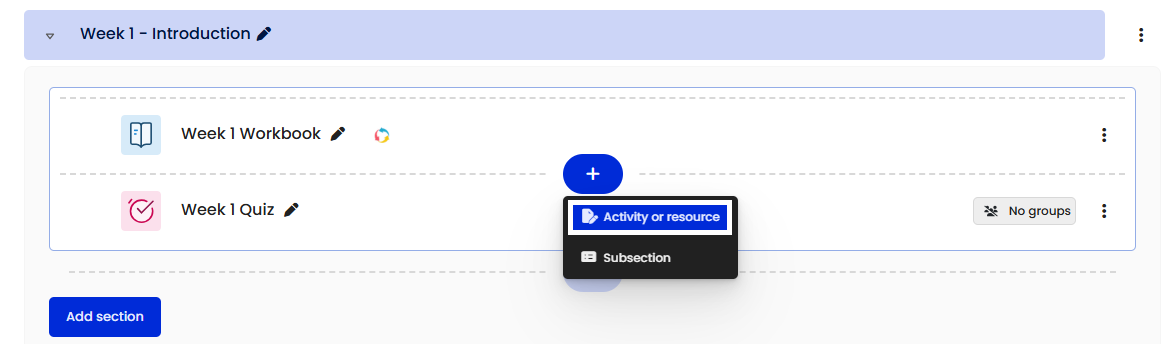
- Select Text and media area from the Add an activity or resource chooser.

- Add a meaningful name to the Title in site index text box.
- Add your welcome message in the Text input field.
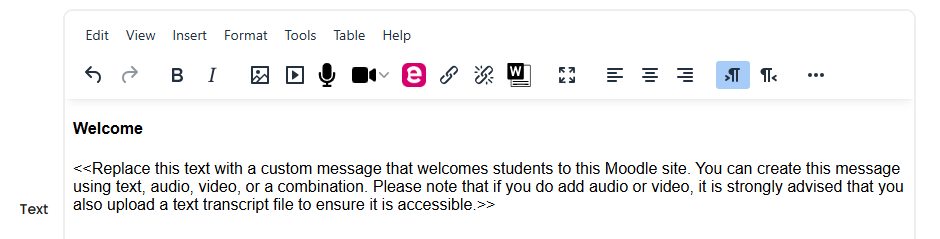
Note: If using audio or video in your welcome message, please refer to the Best practice for adding audio to your site and Adding your own audio and video to a subject site articles. Also, providing a text transcript is important for accessibility. - If Activity completion is turned on in your subject site, expand the Completion conditions section and select None.

Note: Enabling Activity completion on a Text and media area is generally unnecessary, as there is no action required beyond reading the information. - Click the Save changes button.
Related Information
References
Garrison, D. R., Anderson, T., & Archer, W. (2001). Critical thinking, cognitive presence, and computer conferencing in distance education. American Journal of distance education, 15(1), 7-23.
Garrison, D. R. (2016). E-learning in the 21st century: A community of inquiry framework for research and practice. Taylor & Francis.
 Assistant