

Engaging Strategies for bringing assessment to life

Catherine Stephen | School of Nursing (SMAH)
Catherine describes delivering a subject across diverse locations, which shapes how students engage with assessment tasks. To address this diversity, a flexible assessment design was developed, centred on the fictional Highfield Road General Practice.
I'm Catherine Stephen from the School of Nursing, and I coordinate SNUG 107 Primary Healthcare. SNUG107 is run in the first year, first semester. So it's the first introduction that students would have to what is known as primary healthcare.
So the aim of this subject covers the broad aims and philosophical principles of primary healthcare; but it also takes a deep dive into the nurses' roles and responsibilities in providing that type of care in the community. It's a big cohort in that we had over — it was 670 students over 6 campuses. So we've got a diverse mix of rural, regional, remote, and also metro. So those students in their own little geographic locations have very different experiences. So the way that they're going to approach a case study or patient data is really going to be influenced by what they know and what they understand in terms of health and wellness. So again, this really aimed to kind of target those students and their unique experiences, and also through a lens of the social determinants of health. So where you've got very diverse patient experiences, you've also got diverse student experiences.
So this again, was an opportunity for a large cohort to really bring a section of themselves or a piece of themselves to this assessment task. This task that I'm talking about today really fits into a suite of assessment tasks that mirror the activities of general practice nursing in primary care. So we decided to make the option of creating a gen AI general practice, which was Highfield Road, and all the assessment tasks were set inside this location. So it mirrored typical nursing activity within this speciality.
For example, the first assessment was a group project that was aimed at like an in-service, also known as kind of like a tool talk, where the student nurses were going to educate their fellow multidisciplinary team on the SDGs. The second assessment task was a case study approach, and then the third and final one was about a health campaign directed specifically at that individual patient that they have selected and look at their issues from a social determinants lens. So really those three assessment tasks were as close as we could get to doing the broad spectrum of what general practice nurses do in general practice.
Catherine: "In 2023, we created a gen AI general practice called Highfield Road that I situated all the assessment tasks in. It's actually an image that I created based on what a typical general practice in Australia would look like. The first iteration of the image actually had Kangaroos in the waiting room, so we had to pair it back a little bit until it became a little more contextual."
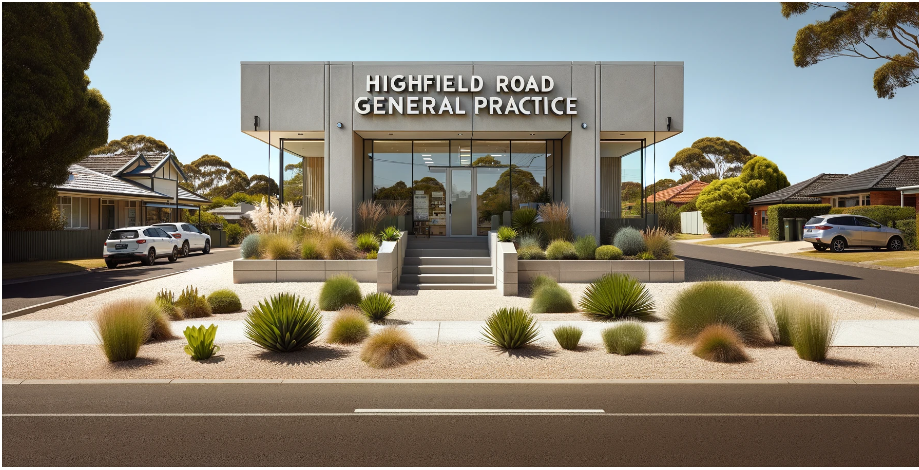
Catherine: "A general practice is a centre, often within all of our communities, where general practitioners, nurses and allied health will come together to, case by case, manage patients as the needs arises. So setting our assessment tasks within the doors of Highfield Rd became an opportunity to bring the students along with us and from day one, getting them to think and practise as a general practice nurse, a registered nurse, which they will be very soon."
"It was actually named after my football team at Coventry City. That's their old home ground that they used to play on. And so that was a little bit of an imprint of me in this assessment."
- Catherine Stephen
Catherine: "When the students would go through the Moodle site and would engage with the course material, they would see these little pockets or these areas or images that I had used AI to create and also that would be explicit in the descriptions. So creating something like Highfield Road General Practice, not only helped the students to locate themselves as a future nurse in that speciality, but also demonstrated that the teaching team, the subject coordinator, was also getting on board with the use of AI and to use this as a tool. I think it was helpful for the students to see us as an educational team trialling the use of gen AI, and for them to be trialling alongside us."
So we implemented last session an AI generative activity called "Who do you See?" It was designed to get students to think about patient data in the form of a case study and actually bring that data to life through using generative AI to create the actual person that they saw in their mind's eye. We gave students an opportunity and some time to actually read the patient data, come up with their selection, because they had four to choose from.
Now, all of these four case studies really did have quite nuanced, both explicit and hidden social determinants of health issues within them. So it became the student's job to really engage with these case studies and select one. Once they selected one person, then it was the opportunity to create the generative AI image, and from that image creation, that was the springboard for them to prepare for their interactive oral; which is similar to what we're doing here now - you're asking me questions about the topic, I'm trying my best to answer them and to display a little bit of my understanding about this. That was what the students were doing. We asked them three questions on their chosen case study. So together with their image and what they knew about the case study and their understanding, they would provide a little bit of critical analysis about the health concerns of the participant identifying the social health determinants behind the story, and then also coming up with strategies to best tackle the issues that were addressed in the case study.
So it was a real essential and quite a creative process for them to engage with their second assessment task; and it really helped them, to prepare some of the answers that we got in the viva voce were directly related to their image, in terms of one student said when we were looking at the 19-year-old who was in a situation of, at risk of homelessness, food insecurity, social isolation; one student said: "I could see that person staring back at me when I made my image." So it was a real, valuable way of creating those connections that ordinarily when we're trying to do case studies or case stories we sometimes miss. So, again, it was a great preparative step for them to be able to go into their interactive orals and really talk about that case study with some authenticity.
In the second SNUG107 assessment, students select one of four case studies. Students then focus on a relevant modern health issue and analyse how upbringing, place of residence and work affect health and well-being.
Using the case information and analysis, students generate a gen AI visual representation of the selected case and share it on Padlet during the relevant online study week. This helps students to deepen their connection with the individuals’ narratives, which is crucial preparation for the subsequent interactive oral assessment task. 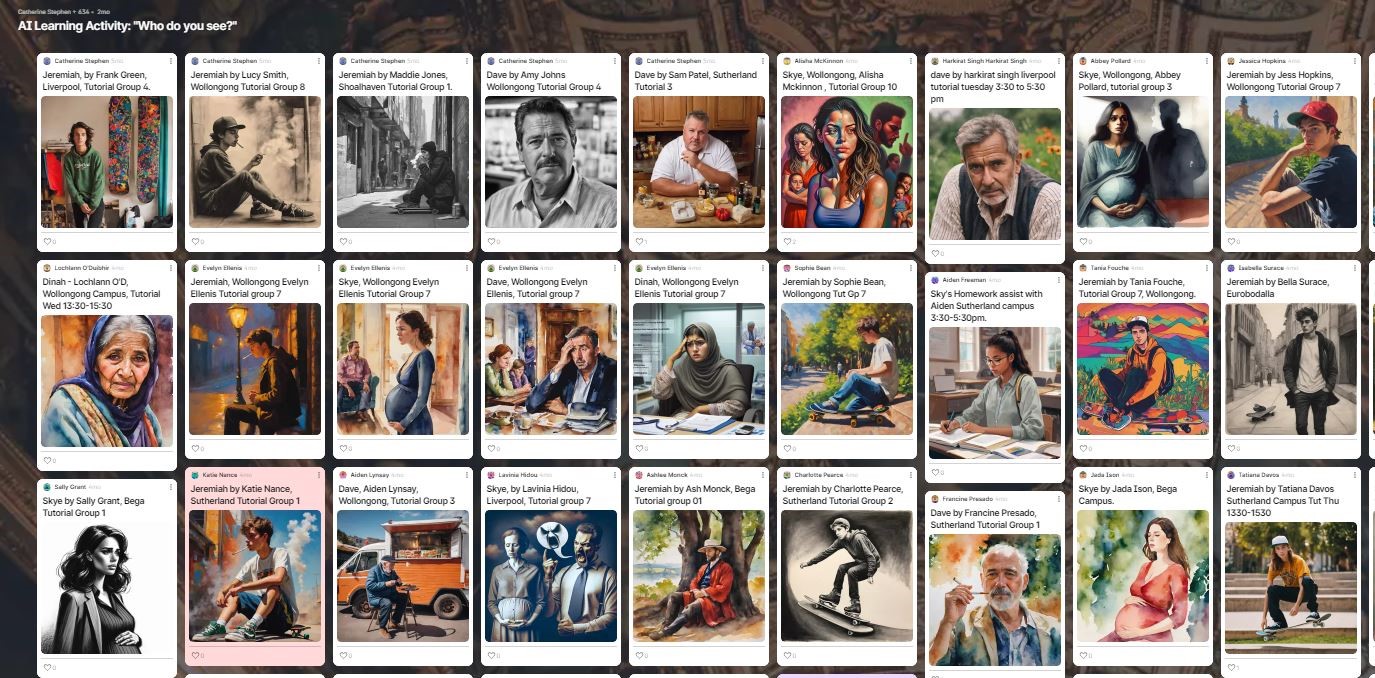
Previously, the teaching team sourced stock images for the case studies. However, moving to gen AI has introduced opportunities for students to actively engage with gen AI tools in a low-stakes setting, synthesise their learning in personally relevant ways and share it with others; aligning with consideration of Universal Design for Learning (UDL) (CAST, 2024).
How?
In the video below, Catherine outlines the practicalities of creating and facilitating a gen AI-based task.
So in terms of them creating their AI image, we did give some instructions in terms of how they would be able to use the system, which was Padlet, that we elected. That made it very fair and equal for all participants and all students to be able to use, because you don't have to go offside or offsite to do it. Originally, before the plugin became available for Padlet, we were using outside providers such as DALL-E or DaVinci - with mixed results.
So in terms of instructing the students on their ability to construct their ideas and why they were doing it, we did have a couple of informative videos to begin with, prior to the task to show, this is actually how you select the creative AI part of Padlet.
And then also in terms of thinking about your prompts, what is it that you see without bias, without kind of predetermination and just using the case study and the salient points of the case study; how are you going to engineer that prompt? And really and truly, the students were guided by their own ideas, preconceptions and stigma before actually entering their prompts and that's why we had such varying results.
Catherine developed a Padlet discussion board using a Recipe template (AI Art Studio), incorporating instructional guidance for the activity. She limited the input options of the ‘Post field’ to only allow the ‘I can’t draw’ functionality. Catherine then created a Moodle Padlet activity in the relevant section of her SNUG107 subject site, allowing students to access the Padlet board from within Moodle.
These design choices align with Universal Design for Learning (UDL) principles, supporting student motivation and agency. To support Welcoming Interests & Identities (Design Options for Welcoming Interests & Identities), Catherine integrated Padlet’s “I Can’t Draw” function, allowing students to select and customise visual styles for patient avatars and revise them without penalty, optimising choice and autonomy (UDL Guidelines, Consideration 7.1; CAST, 2024). Prompting students to assign names and personal details to their avatars allows a human-centred approach to cases and prompts reflection on assumptions, optimising relevance, value and authenticity (UDL Guidelines, Consideration 7.2; CAST, 2024). Through sharing their images on Padlet, students co-constructed a library of patients, allowing them to draw comparisons and consider biases in medical diagnoses and stereotyping for later whole-class discussion, creating a collective learning experience (UDL Guidelines, Consideration 8.3; CAST, 2024).
Reflection & impact
Catherine: "So the high rate of engagement actually surprised me, and it certainly surprised the team that I was working with because everyone in the school was keeping a bit of an eye on this activity because it was so new. It was true after 600+ submissions were made on this one activity, which really shows that the high student engagement for something that wasn't weighted. Why do I think that they engaged so readily with it? I feel that they had an opportunity and they used it. With conservative narratives around using AI in teaching, we as faculty were learning alongside those narratives too. So turning it back as ‘students as partners’, I think that's why they jumped to this opportunity."
"I also think that they genuinely were looking at a novel way to engage with their learning material. Really, I just supplied them with learning material. It was case studies. They're used to this. They'll have them throughout their three years of nursing degree, but how are you going to get to grips with the actual patient data that's there? How are you going to understand the person and the social determinants of health that this person faces every day? If I've given them a tool to be able to do that, then that's a win in my book."
"Students felt they were part of the partnership of learning together, and this was an opportunity for them to get another aspect of their learning under their belt."
This high response rate to a non-weighted activity suggests it was effective in fostering an authentic connection to the subject material and motivating students to actively participate. The success of this activity demonstrates the potential of integrating generative AI tools through existing Moodle applications like Padlet to enrich learning experiences.
In the video below, Catherine offers advice for colleagues interested in running a similar activity with Padlet.
I think now more than ever, as educators, we've got opportunities to use these tools. And Padlet is something that is so simple to just connect to your Moodle site. And what I really enjoy about Padlet is the user experience. It's so simple for the students to operate and you can trial it yourself. You can have a Padlet, and then you can switch onto your student mode and just see what that looks like for a student coming into your site. And then you can understand how simple it is and creative it can be.
But I am a bit of a, a Padlet convert. There are issues in terms of it, when it's high traffic and high volume, it can lag a little bit. But as a tool, it really helps the students to explore ideas either creatively or in text, in, in quite a non-judgmental way. It's great to use in class too. Often when we do activities such as the gen AI image creation, we actually use that in tutorial to actually have open discussions on. And what's great is you can set the settings for students to go and engage with other students' work if that's something that helps with whatever activity you're doing.
When you talk to a student nurse in first year, and you describe to them that they have agency, that they have license to innovate, it really is, it's very inspiring. Like, we've got goosebumps thinking about it, because they're obviously the future, and in a session where we would do gen AI image creation, after that I'd be, you know, kind of like going around the room, we'd be talking, but I felt that this was more of a respectful hands-off learning experience for the students. Particularly, they were the ones that were seeing the bias. I felt that I was more hands off. I would guide discussion, but it was just so, stimulating, it was informed, the discussion that they were coming out with, they were helping each other. And it really made me think that they were building in confidence. As they built in their confidence with AI use, so did mine. And it almost made me a little bit more bold to trial and to take that trial spirit into my research. So if, if anything, I'm more grateful for the students who participated in this experiment, as it were, because it's inspired me to look at AI use and how we can best use that as a tool to help people to self-manage chronic conditions. So it's come full circle. Yeah, and I'm grateful to the students to be able to show me that too.
Feedback
Student comments from Qualtrics survey (n=354)
"It was fun at the same time helpful to understand the issue more clearly as I look at his issue as he is my friend"
- SNUG 107 student
"It was so fun creating the AI as it provided a concept on the individual's personality and character"
- SNUG 107 student
"I thought it was a great idea. It gave Dave's story more meaning and a face to go with the story. I thought it was a great idea."
- SNUG 107 student
"the AI task was so much fun and really helped me to connect and understand the task more. I didn't feel like I was just doing a case study on a random made up person, I got to create a whole character. it definitely made me feel more engaged with the work and I was reading the case study over and over creating the perfect images of the person I imagined. I think future tasks like this one that allow the knowledge learnt to be used creatively would help engagement in topics."
- SNUG 107 student
"It is a wonderful experience to have this kind of activity and I am looking forward to have more innovative activities like this in the future."
- SNUG 107 student
"Much better than a 1500 word assessment. Gave me a better understanding on what I was doing."
- SNUG 107 student
"Would love to create more tasks like the AI image activity. It was fun creating it and looking at other students responses"
- SNUG 107 student
"honestly I really enjoyed this assessment task i thought it was such a creative way to conduct an assessment"
- SNUG 107 student
Support resources
- Padlet Quick Steps Guide | IMTS Knowledgebase article
- Universal Design for Learning | L&T Hub article